MATTER MANAGEMENT FOR LAW FIRMS
Documents, billing and work
A full matter view inside iManage
Built for law firms running iManage Work, Co-Flo brings your documents and emails, billing information and task progress into a single-pane-of-glass view, without needing to leave iManage.
The iManage | Co-Flo Solution for Law Firms
A single-pane-of-glass view of every matter: documents, billing, and work, brought together and delivered directly inside iManage.
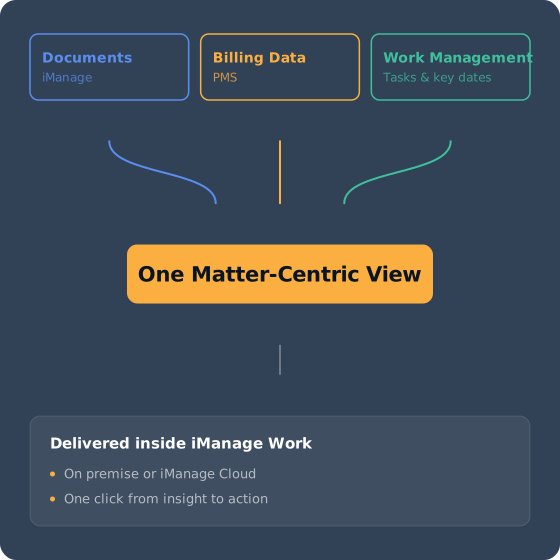
Co-Flo is the first matter management system built directly into iManage, rather than beside it. It sits inside the iManage Work interface your attorneys already use day to day and combines three data threads into one matter record: documents and correspondence from iManage, billing data imported automatically from your practice management system, and native work management, tasks, calendars, key dates and matter stages into one concise, matter-centric view.
Each information thread brings a different piece of value to a matter. Work management is native to Co-Flo: tasks, calendars, key dates and stages that track a matter from open to close. Billing data is imported from the practice management system and kept current automatically: fee estimates, work in progress, invoices and outstanding balances. Documents and emails come from iManage itself: filings, correspondence, contracts and the exchanges that matter.
Co-Flo combines the three, keeps them current and presents them the way attorneys work, by matter, not siloed by system, turning operational activity into evidence: evidence of workload, of performance, of value.
See who's working on what before it becomes an issue
The challenge: Firms can often see workload at the matter level, but rarely at the task level, which is where the reassignment decisions need to happen. That level of oversight is usually left to the partner leading each team, who manages it manually and relies on recurring meetings to catch client issues before they surface. There's no way to see workload at the firm, region or individual level, and no way to reallocate work when someone is out or overloaded.
How Co-Flo helps: Co-Flo gives practice leaders a live view of every matter's stage and status, along with who's working on it. Bulk reprofiling lets managers reassign matters and tasks in a couple of clicks when a team member is away, or when workloads need to shift, without anyone having to ask around first.
All tasks in one place
The challenge: Firms lack a matter-centric view of tasks that shows all the work tied to a matter, not just what's assigned to one person. That makes it hard to judge how much is done, how much is in progress and whether the matter is tracking to the fee estimate the firm gave the client.
How Co-Flo helps: Co-Flo's task templates automate the creation of the full task sequence for a given work type, reducing the time spent on repetitive phases of work. Every task rolls up to the matter record, giving the whole team, not just the individual assignee, a shared view of progress.
No deadline dependent on someone's memory
The challenge: A missed court date or statute of limitations deadline is one of a firm's most expensive mistakes, and key dates are often tracked in someone's personal calendar rather than in a place the whole matter team can see them.
How Co-Flo helps: Each matter in Co-Flo can have its own calendar. Key dates can be viewed in the matter overview, in a personal calendar that aggregates dates across an attorney's matters or synced with Microsoft 365, Outlook, To-Do or Planner.
Tasks and task templates can be linked to key dates, so deliverables due before a deadline appear as dependencies rather than surprises.
Know where a matter stands financially
The challenge: Billing data lives in the practice management system, work progress lives somewhere else and nobody sees the two together until a write-down is already unavoidable.
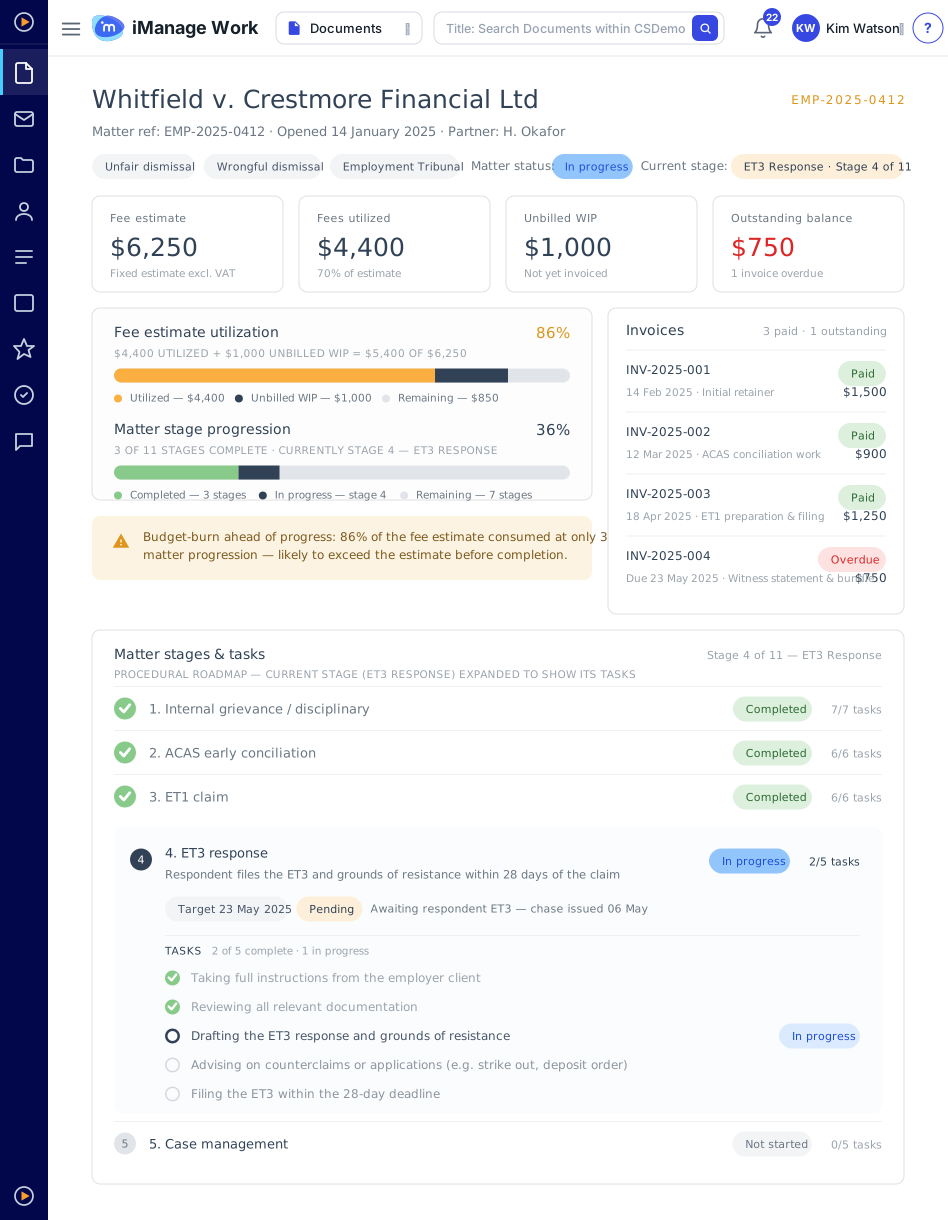
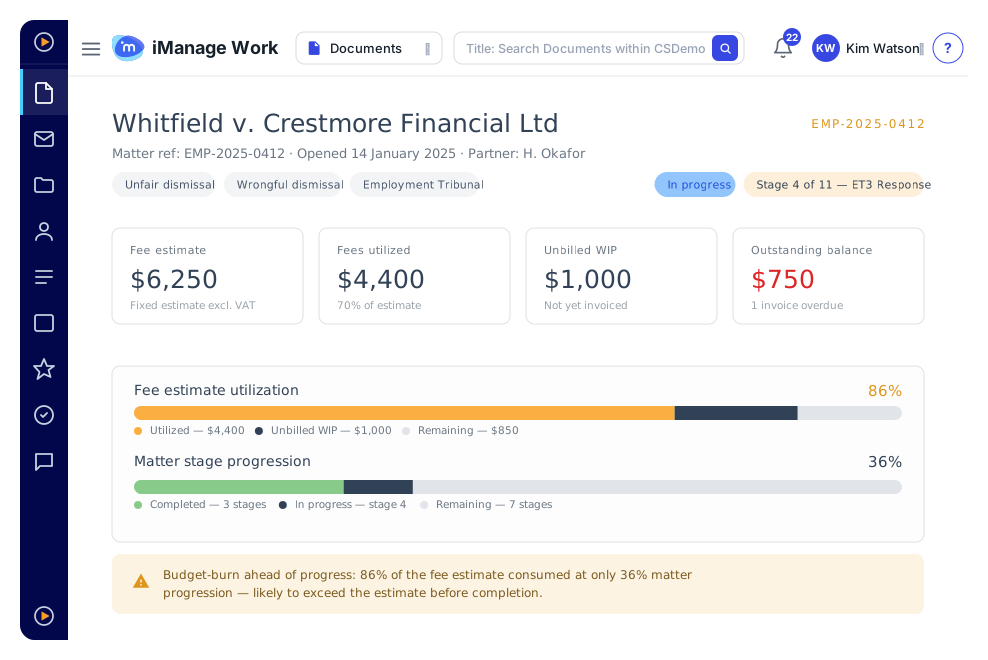
How Co-Flo helps: Co-Flo imports fee estimates, work in progress, invoices and outstanding balances directly from the firm's practice management system into iManage and automatically keeps them current.Paired with real matter-stage progress, that gives an earned-value view of the matter, so a fee estimate that's 86% consumed against 36% stage progression is visible weeks before it becomes a client conversation nobody wanted to have.
Records that update themselves, with a person still in control
The challenge: Keeping a matter record accurate means someone has to update it, and attorneys are busy doing billable work, not data entry.
How Co-Flo helps: Co-Flo's AI agents monitor documents and emails saved in iManage and update the matter record, including the progress stage, status and key dates, without anyone filling in a form.
They read content and activity, extracting parties, dates and deal terms onto the matter record for a person to confirm. Every change goes through human approval, so the record stays accurate as agents take on more of the update work.





Status meetings stop being the only source of truth
Partners and practice leaders see workload, stage and risk across the team in real time, instead of waiting for the next check-in call.
Attorneys get one place to look instead of five
A personal dashboard lists each attorney's tasks, key dates, and matters on a single screen, removing the need to scan email and Teams for what's outstanding.
Write-offs get caught before the invoice goes out
Combining billing data with real work progress gives an earned-value view of each matter. This enables a firm to intervene while there's still time to have the conversation with the client.
Reassigning work takes a couple of clicks
When someone is out or a matter needs to shift, managers move it without losing the history or context attached to it.
Key dates stop depending on memory
Court dates and statute of limitations deadlines sit on the matter calendar and sync to Outlook and To-Do, so they don't rely on one person remembering to check.
The matter record updates itself
AI agents read documents and emails filed in iManage and propose updates to stage, status and key dates, with a person confirming each change before it's applied.
Built for every role on the matter
Attorneys and fee earners get a personal, matter-centric dashboard with priorities and next actions laid out, instead of buried in email and Teams. Practice group leaders get real-time visibility into workload and risk, so imbalances surface early. Managing partners see billing data reconciled against real work progress, cutting down on write-offs.
Co-Flo isn't a separate application bolted onto iManage. It's embedded inside the iManage Work interface a firm's teams already use, meaning there's no new system to learn and no context switching between platforms during the day. Co-Flo's application suite sits directly on the iManage platform: one governed stack, not an add-on.
Security is applied consistently at whatever level a firm already manages it, through iManage Security Policy Manager or access control lists, and Co-Flo's data is co-hosted in the same Azure data centers as iManage. Tasks and key dates sync with Microsoft 365 and iManage Tracker, so they appear in Outlook and To-Do without needing a separate system to check.
Most firms haven't invested in matter management because the systems on the market are complex, expensive and slow to implement. Co-Flo is scoped against a firm's existing matters and clients already in iManage, so there's no data migration and no second platform to stand up.
Further configuration, additional matter stages, task templates and custom metadata are optional and can be phased in by practice group once the base deployment is live